Witness configuration
Ballast never reimplements cluster quorum. Quorum, vote counting and witness
communication all belong to Windows Failover Clustering — Ballast's role is to
declare which witness a cluster should use and reconcile the cluster to that
declaration via Set-ClusterQuorum, the same as an operator would by hand.
Declaring a witness is coordination; counting votes ourselves would not be.
Witness types
| Type | Notes |
|---|---|
| File share witness | A single SMB share reachable by every cluster member. Simplest option for a single site or a small ROBO deployment. |
| Cloud witness | An Azure Storage account used as the witness, avoiding a dependency on any one site. Fully supported as declared desired state, the same as file share and disk witnesses. |
| Disk witness | A shared disk dedicated to quorum. Requires shared storage already provisioned. |
Declaring a witness
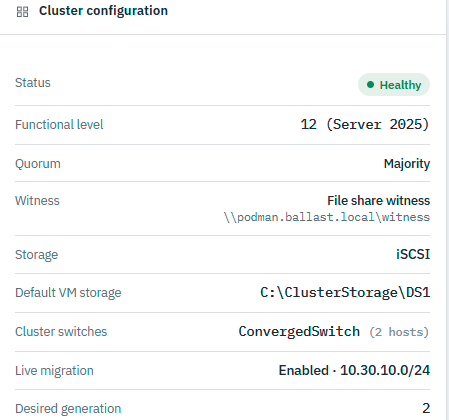
A witness is part of a ClusterSpec's quorum configuration. On apply, the
centre drives the cluster's designated node to run Set-ClusterQuorum against
the declared witness; the agent does not invent a witness choice on its own.
A cluster's Summary tab shows this as declared, live state — not just an API field:
Quorum and Ballast's autonomy story
Quorum and the centre-offline autonomy story are deliberately separate concerns. A cluster keeps deciding failover and ownership via its own quorum even if the Ballast centre is unreachable — that is Windows Failover Clustering's job, unaffected by Ballast. What the centre being offline changes is only whether new desired state can be declared; each agent keeps enforcing what it already has, cluster membership and quorum notwithstanding.
Changing a witness later
Changing the declared witness (e.g. moving from a file share to a cloud
witness) is the same reconcile pattern as any other desired-state change:
update the ClusterSpec, and the designated node's agent drives
Set-ClusterQuorum again. Because witness config affects quorum, it is held
for explicit operator approval rather than applied automatically — see
Auto-revert vs approval-gated.