Join a cluster
Ballast coordinates with Windows Failover Clustering rather than replacing it. Cluster formation, quorum and failover are owned by the cluster service; the centre declares intent and reports state, it does not hand-roll consensus.
Prerequisites
- Every host you intend to add has provisioned networking
and matches the others closely enough to pass cluster validation. Ballast
runs this validation for you: the host designated to form the cluster (the
"former") runs
Test-Clusteritself as part ofNew-Cluster, so there is no separate validation step to run beforehand. - Shared storage is in place: Storage Spaces Direct (S2D) with Cluster Shared Volumes (CSV) in v1.
- A witness is configured — file share or cloud, matching your quorum model.
Forming a new cluster
Declare a ClusterSpec naming its member hosts. On apply, the centre assigns
each named host's agent the work needed to bring it into the cluster; the
cluster itself is created via New-Cluster.
From the console, the fabric's + menu → New cluster… is a multi-step dialog that authors this for you:
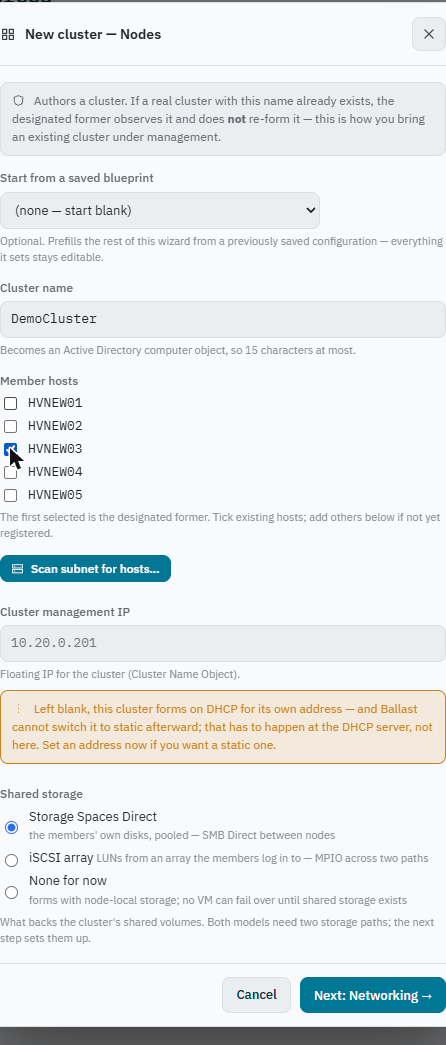
- The cluster name becomes an Active Directory computer object (the CNO), so it's capped at 15 characters the same as any Windows computer name.
- The first host ticked in Member hosts is the designated former — the
one whose agent actually runs
New-Cluster. Scan subnet for hosts… finds hosts on a subnet that aren't in inventory yet, to add before forming. - If a real cluster with this name already exists, forming observes it rather than re-forming it — this is also how an existing cluster gets brought under Ballast's management.
- Leaving Cluster management IP blank forms the cluster on DHCP for its own address; Ballast cannot switch that to static afterward from here — that has to happen at the DHCP server, not in the console.
- Shared storage is chosen here too: Storage Spaces Direct (pooling the members' own disks), an iSCSI array, or none yet (node-local storage, no VM can fail over until shared storage exists). The dialog continues to a networking step after this one.
Joining an existing cluster
Declaring an existing ClusterSpec with an additional member host added
drives that host's agent to join it, the same reconcile pattern as any other
desired-state change.
Verifying
The console's cluster view shows every declared member as settled
(Generation == ObservedGeneration), the orchestration steps that got it
there, and the cluster's quorum configuration side by side:
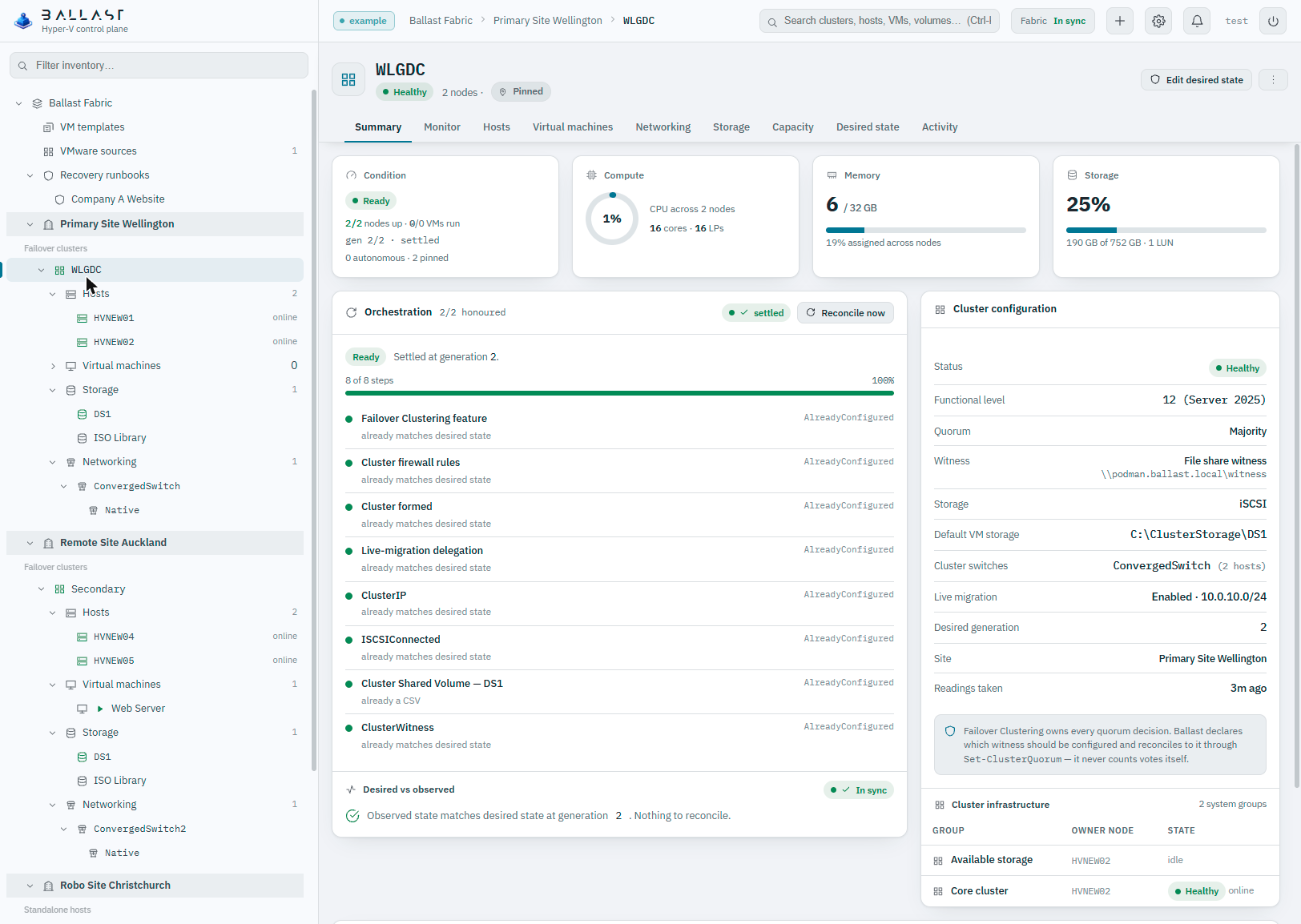
"Settled" here means the generation counter, every reconcile step, and the desired-vs-observed comparison all agree — not a single green dot standing in for all three.
Standalone hosts are not second-class
Everything in Provision a host works identically whether or not the host ever joins a cluster. Clustering adds failover, live migration on host death, and CSV — it does not gate basic host management.