Template creation
Verified end to end 2026-09-16: captured a real template from a powered-off VM on a live appliance and confirmed it landed in the library. Deploying from a template is documented from the dialog's own copy but not yet re-verified by actually deploying one.
From the console's own template library:
A template is a hardware profile, a guest customisation profile, and a generalised VHDX held on storage. Capture one from any VM that is powered off ("Capture as template..." on the VM), then deploy from it: the image is copied, the guest's unattend is written into the copy, and the new VM's desired state is authored once the copy lands — from then on it is an ordinary managed VM. A template on a cluster's shared storage deploys anywhere in that cluster; one on a host's local volume deploys only to that host.
Creating a template from an existing VM
-
Power off the source VM.
-
From the VM's detail page (Settings → Capture as template…), fill in the template name, an optional description, and which library volume to write the image to:
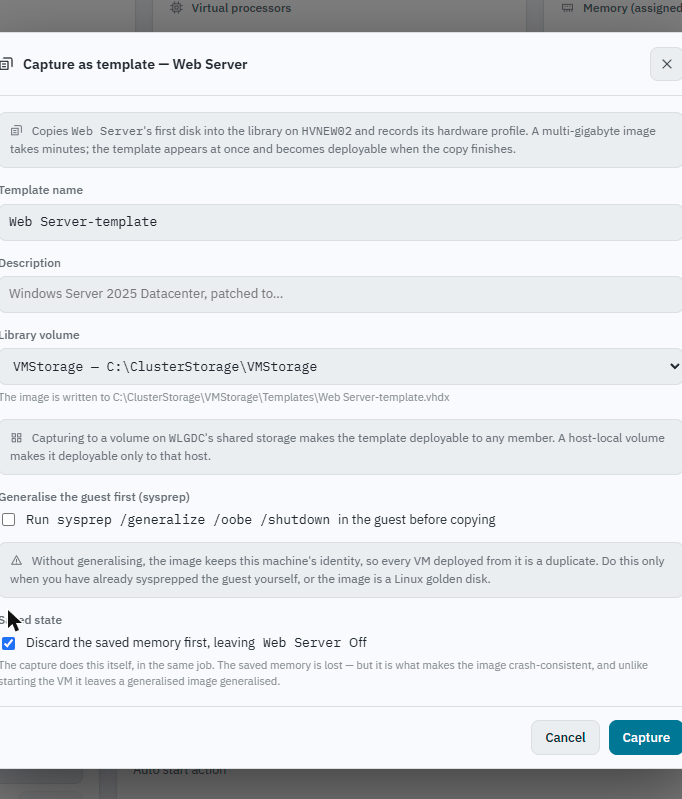
- Generalise the guest first (sysprep) is opt-in, not automatic: without it, the image keeps the source VM's identity, so every VM later deployed from it is a duplicate rather than a distinct machine. Only skip this if the guest was already sysprepped, or the image is a Linux golden disk.
- Capturing a cluster-role VM that's currently offline: Ballast names this exact situation rather than failing obscurely — a VM whose cluster role is offline has no registered Hyper-V object to copy and its power state is unknown (usually Saved, not Off). The dialog surfaces this directly and offers discard the saved memory first, which settles it to a clean Off as part of the same capture job.
-
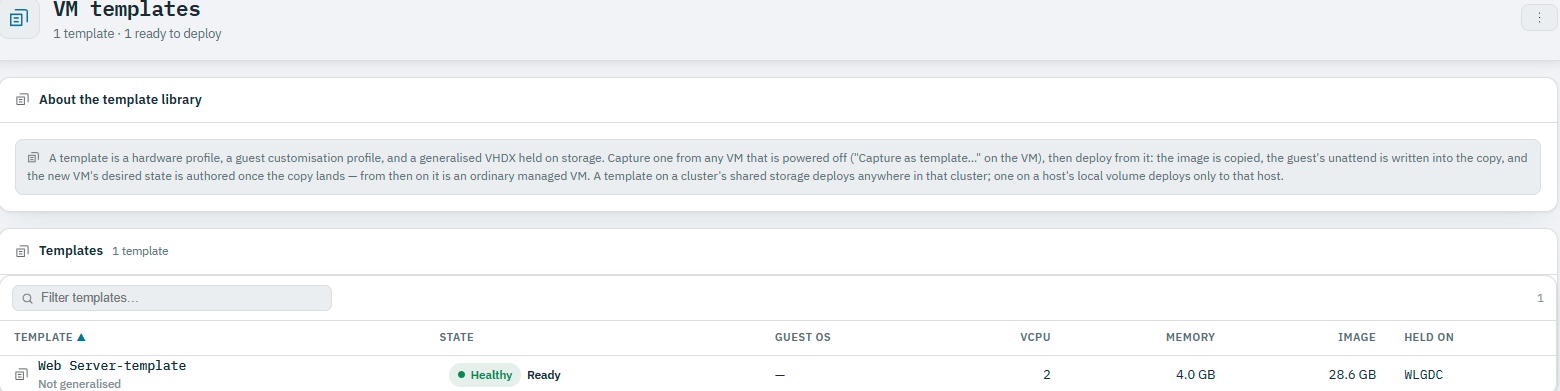
Once the capture task succeeds, the template appears in VM templates with its guest OS, vCPU/memory profile, image size, and which cluster or host it is held on:
Guest OS can show as unreported (
—) rather than failing the capture — it depends on what the source VM's integration services had already told Hyper-V before it was powered off, which a VM captured while its cluster role was offline may not have.
Creating a VM from a template
Deploying from a template asks for the values a template intentionally leaves open — hostname, IP configuration, target host or cluster, and resource sizing — then creates the VM as a normal desired-state object. From that point it is reconciled exactly like any other VM; the template is only how it was seeded.
Where a template can deploy
This is the one rule worth remembering: a template on a cluster's shared storage deploys anywhere in that cluster; one on a host's local volume deploys only to that host. Where you capture it decides where it can go.
Templates and ROBO sites
A template created centrally can be deployed at any site the centre manages, including a remote-office/branch-office (ROBO) site with only one or two hosts — the same template, deployed locally by that site's agent(s), without duplicating the definition per site.