Adopt an existing cluster
Live captures and copy from a real appliance, verified end to end 2026-09-29.
The previous pages build a cluster Ballast forms itself. Most clusters adopters actually have are the other kind: already built, already running VMs, standing in Failover Cluster Manager for months or years before anyone heard of Ballast. This page brings one of those under management without touching what already works.
The mechanism is the same New Cluster wizard used to form a cluster from scratch. If a real cluster with this name already exists, the designated former observes it and does not re-form it — that one sentence is the whole trick. Get the cluster's name (and, if it has one, its management IP) exactly right, and the wizard becomes an import instead of a build.
Prerequisites
- The agent installed on every node of the existing cluster. Point each one at your centre; once every node reports in, they appear in the console as standalone hosts (Ballast has not yet connected them to each other or to the real cluster).
- The cluster's exact name as Failover Cluster Manager shows it, and its Cluster Name Object's IP if it has a static one. Guessing either one is the one way to turn "observe" into "re-form": the wizard's own warning is explicit that a mismatch here re-forms the cluster instead of adopting it.
Step 1, Nodes
Open + → New cluster… from any host or from the fabric root.
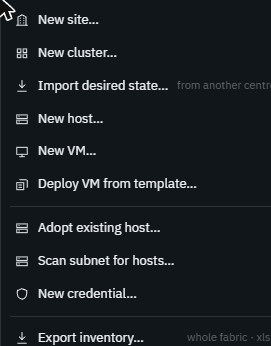
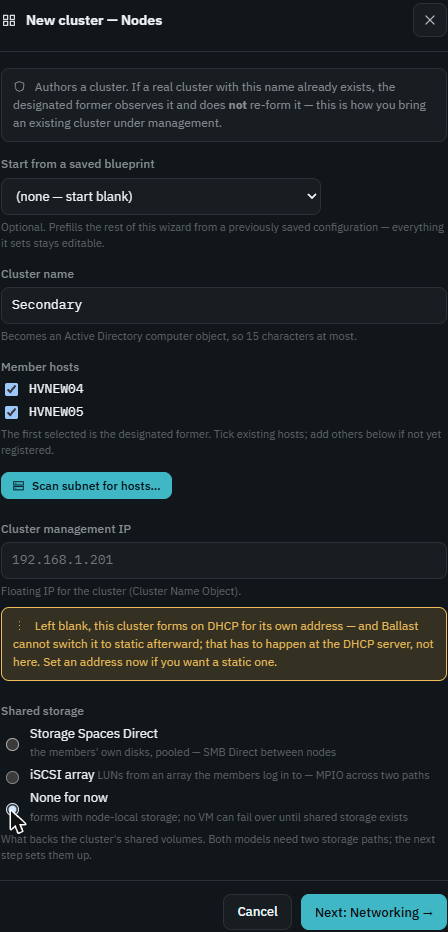
Fill in the cluster name exactly as FCM shows it, tick every existing member host, and leave Cluster management IP blank unless you know the cluster's real static address — leaving it blank does not touch an existing CNO IP, it only matters for a cluster Ballast is forming fresh.
For Shared storage, pick None for now if the cluster already has its own storage arrangement (S2D already enabled, or an iSCSI array you are not ready to hand to Ballast yet). This step only decides whether Ballast provisions storage; it does not touch storage the real cluster already has, and the Storage step that follows still shows the disks it sees so you can confirm nothing unexpected happened.
Step 2, Networking
This is the step worth slowing down for. Every member already has a switch with a real name and real vNICs on it — that's what you're adopting, not replacing — so Import (switch name) from hosts reads it back instead of asking you to retype it.
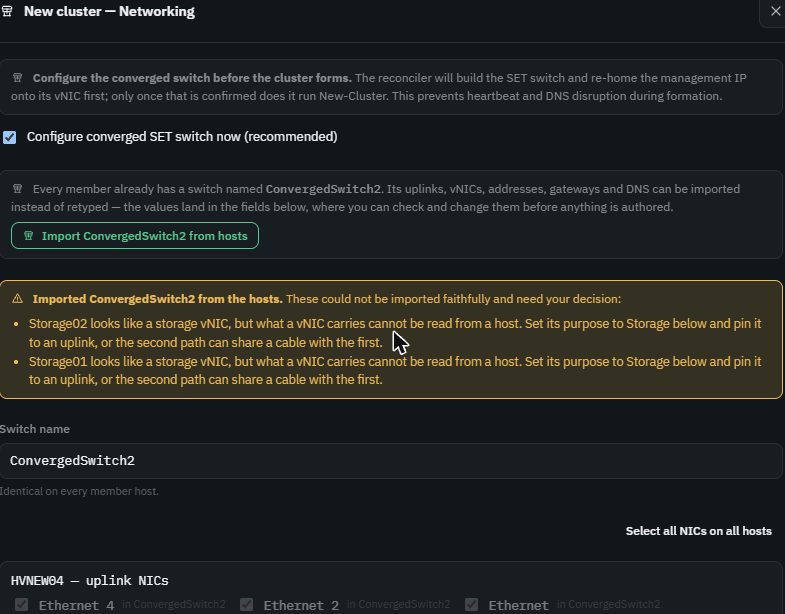
Import, then actually read what comes back. A vNIC's purpose (Management,
Cluster, Live migration, Storage) can't always be read off a host — a name
like Storage01 is a strong hint, not a fact — so the import says plainly
when it isn't sure:
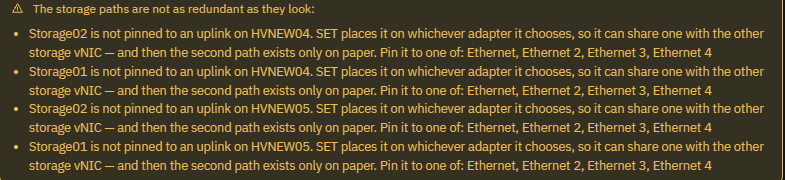
Set each flagged vNIC's purpose from the dropdown next to it. Doing that here surfaced a second, independent finding on this rig — pinning a storage vNIC to a specific uplink is what makes its second path real redundancy rather than SET's own arbitrary pick sharing an adapter with its twin:
The storage paths are not as redundant as they look: Storage02 is not pinned to an uplink on HVNEW04. SET places it on whichever adapter it chooses, so it can share one with the other storage vNIC — and then the second path exists only on paper. Pin it to one of: Ethernet, Ethernet 2, Ethernet 3, Ethernet 4.
This is advisory, not blocking — Next works either way — but it's exactly the kind of gap "review that the import lines up with reality" exists to catch. Pin each storage vNIC to its actual cable if you know the physical topology; if you don't, that's a reason to go find out before relying on the redundancy, not a reason to skip past the warning.
Step 3, Storage
With None for now chosen in step 1, this step only lists the data disks Ballast can see per host and leaves them alone — nothing here is claimed into a pool. If the cluster already runs Storage Spaces Direct, Ballast reports it as observed fact on the cluster page once adopted; it just isn't declaring or managing it from this wizard run.
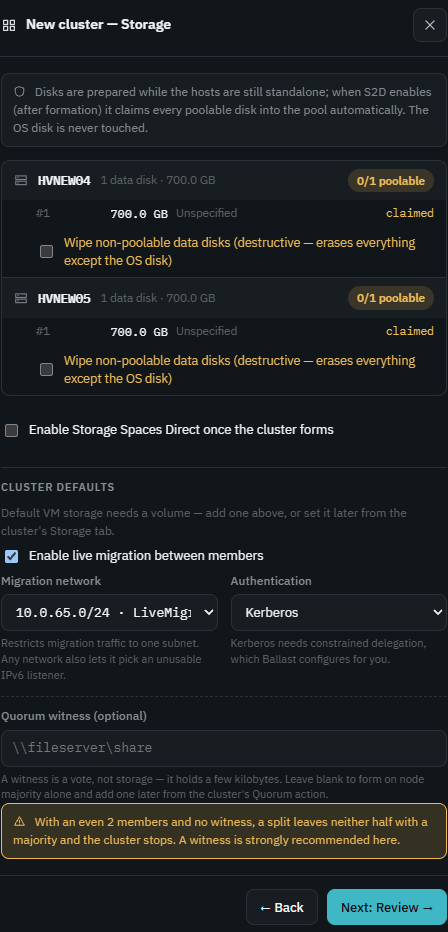
This is also where the quorum witness is set, and it's worth setting even on a cluster that already has one, so Ballast's desired state matches what's real rather than reporting the witness as unmanaged. With exactly two nodes and no witness, a split leaves neither half with a majority and the cluster stops — the dialog says so plainly rather than leaving it to be discovered during an outage.
Step 4, Review
Everything from the previous steps, laid out once more before anything is authored:
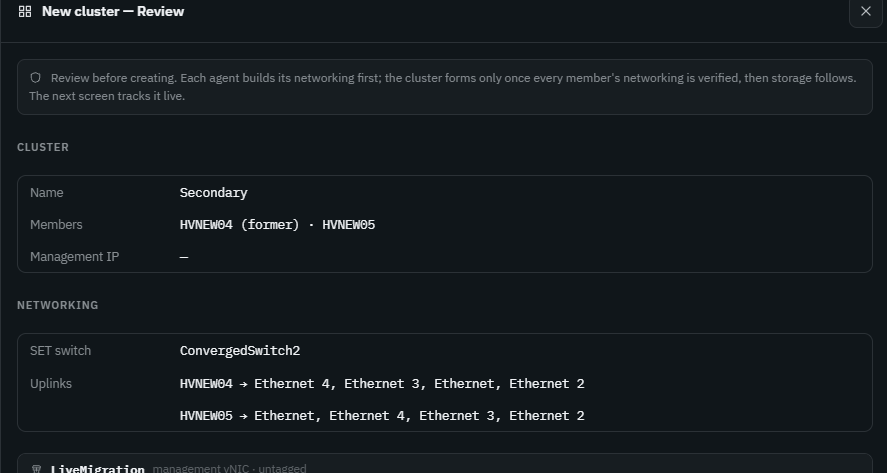
Create cluster at this point does not touch the real cluster's
membership, quorum or roles — Failover Clustering already owns all of
that. It builds Ballast's desired-state document and starts reconciling
each agent's networking against it first (which is where a genuine
mismatch would actually create risk); only once every member's networking
checks out does the reconciler run New-Cluster — which, named after a
cluster that already exists, observes it instead of forming it.
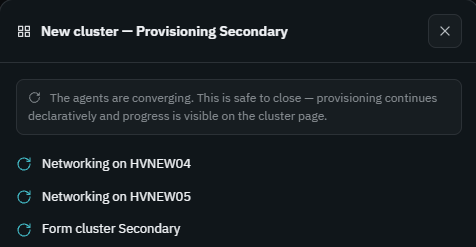
Verifying
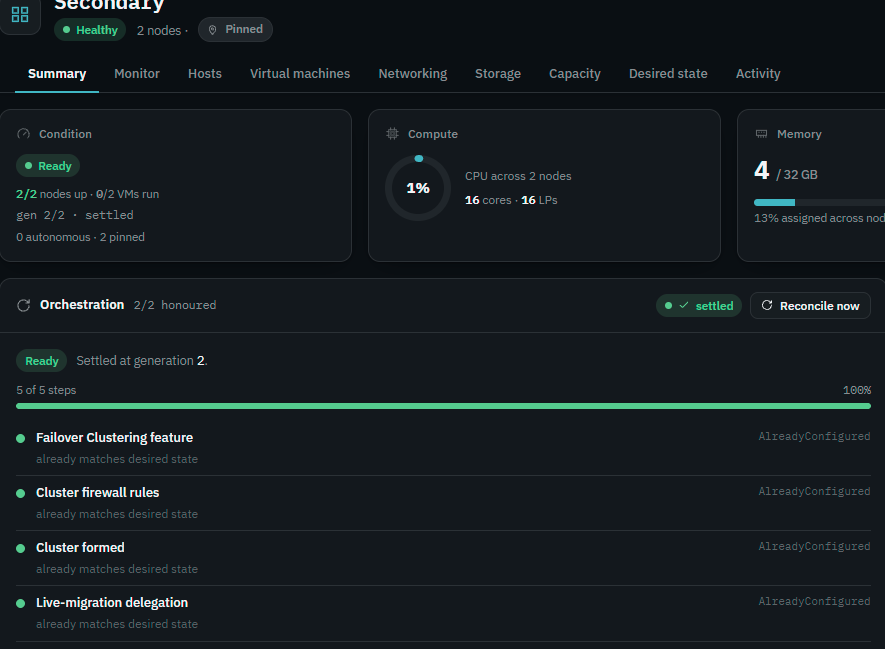
Give it a few reconcile passes — on a small two-node rig this settled in under two minutes; expect longer on more members or a busier network. When Ballast's desired state matches what Failover Clustering already has configured, every step reads AlreadyConfigured rather than the "created" language a from-scratch cluster shows, which is the tell that you adopted rather than rebuilt:
Adopting the VMs
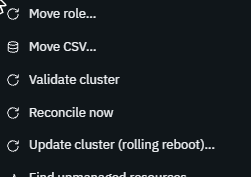
The cluster object settling doesn't mean its VMs are managed yet — a role Ballast doesn't yet author is one it will not repair if it fails or recreate if it's lost, so this step matters as much as the cluster itself. Right-click the cluster and choose Find unmanaged resources…:
This lists every cluster role Ballast observes, checked against what its desired state declares. A role reading not in desired state is one the centre doesn't author — nothing reconciles it, so it stays exactly as exposed as it was before you started:
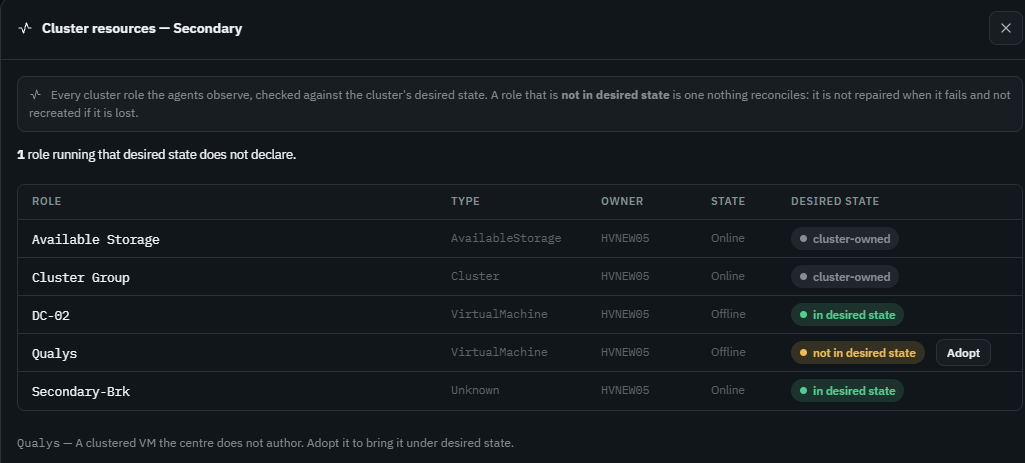
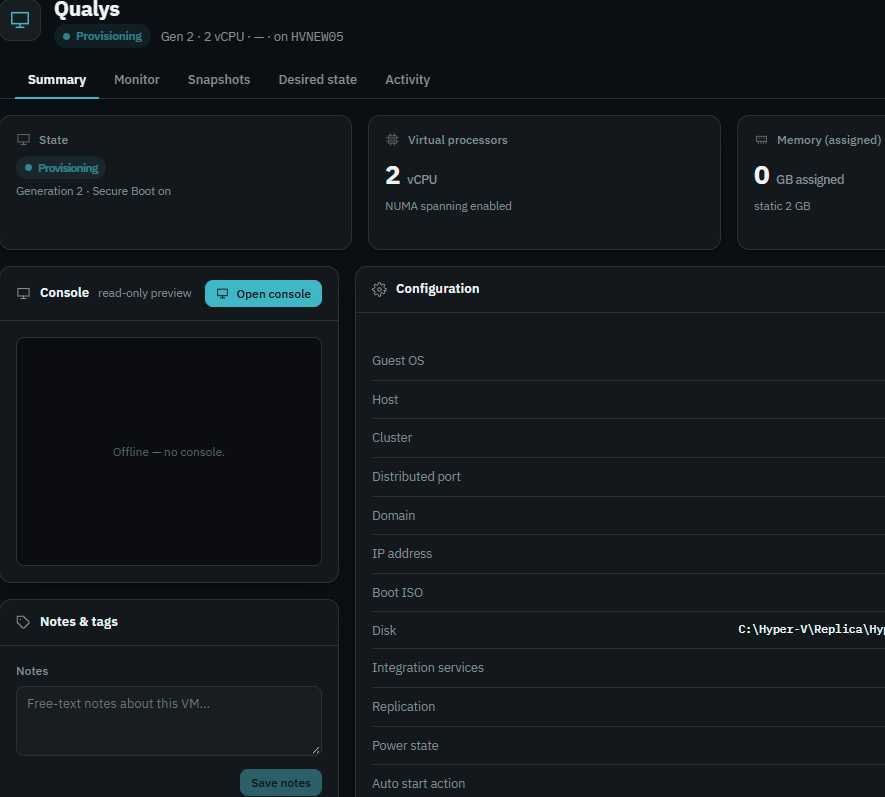
Click Adopt on each one that should be. Ballast reads the VM's current configuration from the host and writes it back as the VM's desired state — its running config becomes the contract, nothing about the VM changes on adoption. The VM briefly shows Provisioning while that spec is authored, then settles under the cluster with the rest:
Not claiming an existing S2D pool or iSCSI array's LUNs in step 3 doesn't block this: VM adoption reads the VM's disk and network configuration directly from the host, not from a storage model Ballast has been told to manage.
A VM whose network adapter isn't connected to anything
If the VM being adopted has a network adapter that isn't connected to a vSwitch on the host — not attached to anything, which happens more often than it should on a VM that's been through a few migrations or template deploys — adoption carries that straight into desired state, and the next reconcile pass fails:
ApplyFailed: ensure vm "Qualys": Connect-VMNetworkAdapter : Cannot
validate argument on parameter 'SwitchName'. The argument is null or
empty. Provide an argument that is not null or empty, and then try the
command again.
To clear it: from the cluster or host's Networking tab, create a distributed port for the VLAN the VM actually needs, then open the VM's Settings, Network adapters, and pick that distributed port for the adapter. One distributed port per VLAN the VM's adapters need — if it has adapters on several VLANs, each one needs its own. The VM stays Degraded on this one step until you do; nothing else about the adoption is blocked by it.
What this did and didn't change
- Did: authored a
ClusterSpecand, per VM, aVirtualMachineSpecthat match what was already running. Ballast now reconciles toward those and will repair drift or recreate what's lost. - Did not: re-form the cluster, touch its quorum configuration beyond what you explicitly set in Step 3, claim an S2D pool or iSCSI LUNs you didn't declare, or power-cycle, move, or reconfigure any VM you didn't explicitly adopt.
From here, Deploying a cluster and the rest of this section apply exactly as if Ballast had built the cluster itself.