Backup and restore
The screenshots and copy below are live captures from a real appliance, verified end to end 2026-09-20.
Ballast splits backup into two artefacts, taken from two places, because they have opposite risk profiles. Getting that split wrong is the single easiest way to hold a year of diligent backups and still lose the fleet.
Why there are two files, not one
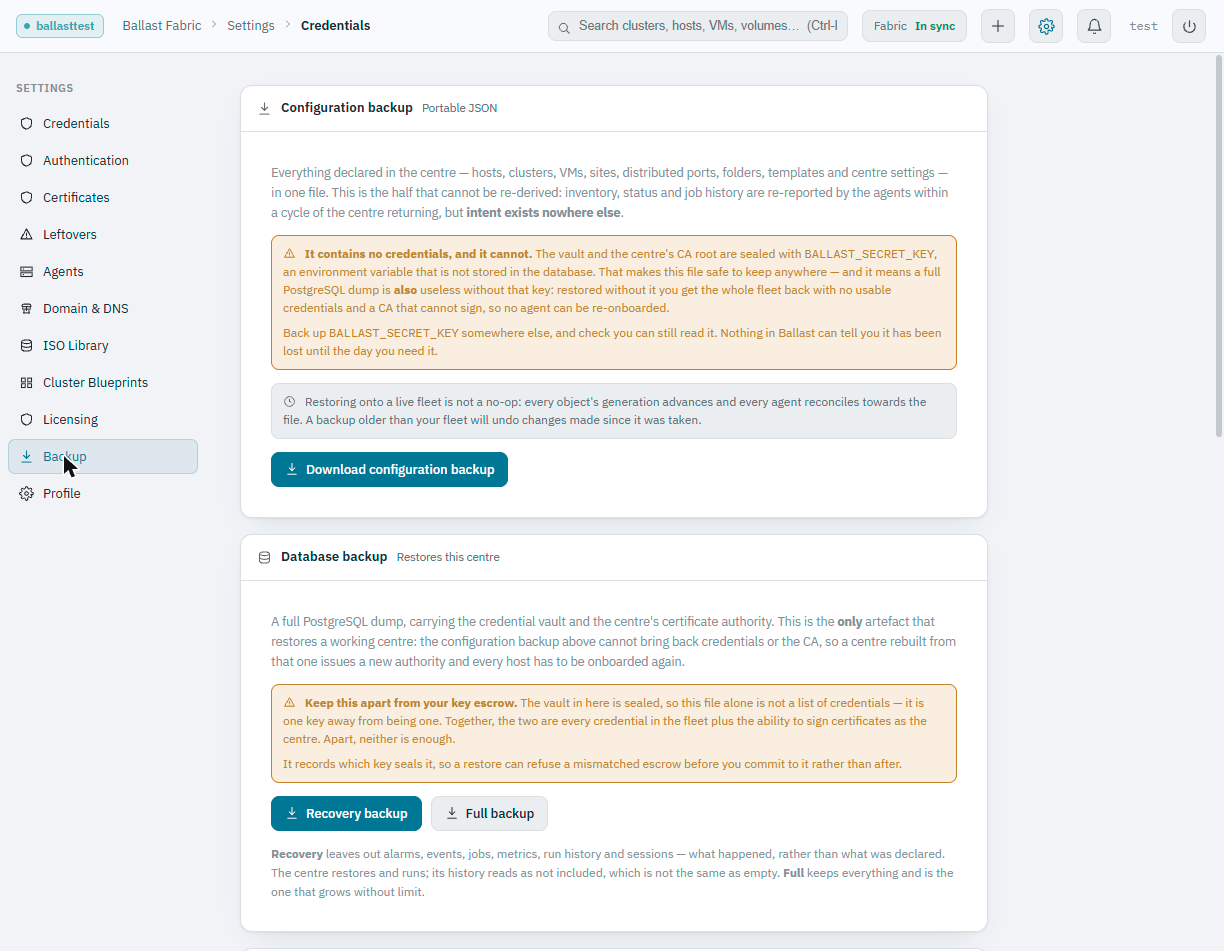
From the centre's own Settings → Backup page:
Everything declared in the centre, hosts, clusters, VMs, sites, distributed ports, folders, templates and centre settings, in one file. This is the half that cannot be re-derived: inventory, status and job history are re-reported by the agents within a cycle of the centre returning, but intent exists nowhere else.
It contains no credentials, and it cannot. The vault and the centre's CA root are sealed with
BALLAST_SECRET_KEY, an environment variable that is not stored in the database. That makes this file safe to keep anywhere, and it means a full PostgreSQL dump is also useless without that key: restored without it you get the whole fleet back with no usable credentials and a CA that cannot sign, so no agent can be re-onboarded.
So:
| Artefact | Contains | Restores a centre? |
|---|---|---|
| Configuration backup (JSON) | Every declared host, cluster, VM, site, port, folder, template and setting | No, no credentials, no CA |
| Database backup (PostgreSQL dump) | Everything above, plus the sealed credential vault and CA root | Yes, the only artefact that does |
| Key escrow | BALLAST_SECRET_KEY, encrypted with a passphrase | Needed alongside the database backup to unseal it |
The configuration backup is harmless and portable, keep it anywhere. The database backup is one key away from every stored credential in the fleet. The escrow is that key. Store the escrow somewhere your database backups are not, keeping both together rebuilds the single-file risk the split exists to avoid.
Taking a database backup
From the centre's Settings → Backup page, two scopes are offered:
- Recovery, everything needed to restore this centre, without the history that only records what happened (alarms, events, jobs, metrics, run history, sessions). The centre restores and runs; its history reads as not included, which is not the same as empty.
- Full, the same, plus every row of that history. This is the scope that grows without limit.
Each dump records which BALLAST_SECRET_KEY fingerprint seals it, so a
restore can refuse a mismatched escrow before anything is committed rather
than after.
Key escrow: create it, then verify it
An escrow nobody has opened is a belief, not a backup. From the same
Settings → Backup page, a passphrase (12+ characters) encrypts a copy of
BALLAST_SECRET_KEY into a download. Ballast never stores the passphrase
and cannot recover it, if it is lost, the escrow is lost with it.
The page also verifies an escrow file directly: pick the file, type the passphrase, and Ballast confirms it opens and reports the key's fingerprint , without touching anything live. A typo'd passphrase, a truncated download, or a file from a different centre all look identical to a good one until the day it is needed, which is the day nothing else is working either. Check it now, not then.
Scheduling backups: Ballast Manager, not the centre
Scheduled backups to a share, restoring one, and repairing database access are all done in Ballast Manager, which runs alongside the centre on its own port, not inside it. Two reasons this cannot live in the centre:
- Mounting a share needs root, which the centre's own service account does not have.
- A schedule stored in the centre's database stops firing exactly when its last backup is the thing you need, the manager keeps running when the centre will not start, the same reasoning behind the agent's own autonomy when the centre is unreachable.
Open Ballast Manager from Settings, Ballast Manager in the console (the
Backup page links to it too), or browse to port 9444 on the appliance. From
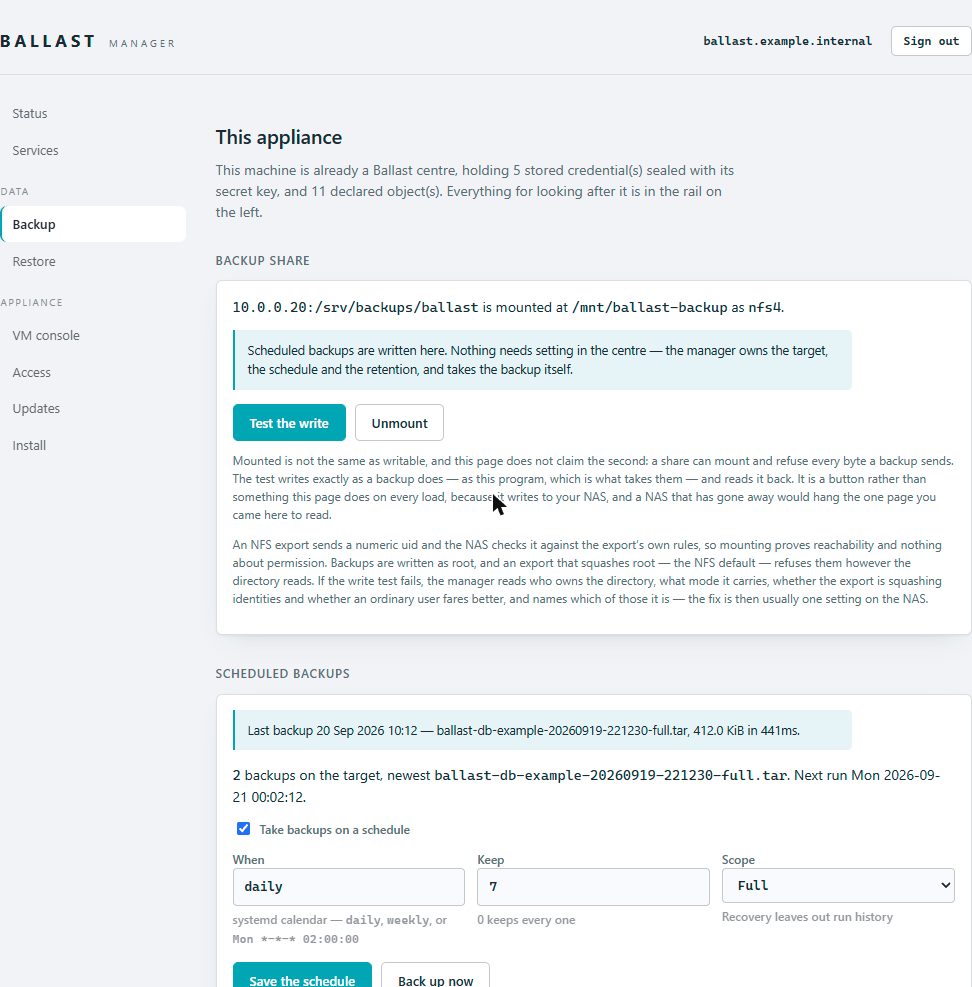
Manager's Backup page: mount the share, then configure the
schedule (a systemd calendar expression, daily, weekly, or an explicit
Mon *-*-* 02:00:00), how many to keep (0 keeps every one), and the scope
(Full or Recovery-only). The outcome, whether the schedule has actually
run, not merely that it is configured, leads the page, because those
are different claims and this product has been caught by conflating them
before: a target can sit configured for weeks with not one backup ever
taken.
Restoring: preview the diff first
Restore is not the inverse of backup. The fleet on the receiving appliance may still be running, so bringing back an old dump's desired state pushes every already-connected agent to reconcile toward it, and restoring a different centre's dump makes every one of them refuse the centre the moment it restarts, because they no longer trust its certificate authority.
Ballast Manager's Restore page is built around seeing that before anything is stopped, not discovering it afterwards:
-
Upload the database backup and its matching key escrow, with the escrow's passphrase. Opening the escrow, reading the manifest and running every check are all read-only, nothing on the appliance changes yet.
-
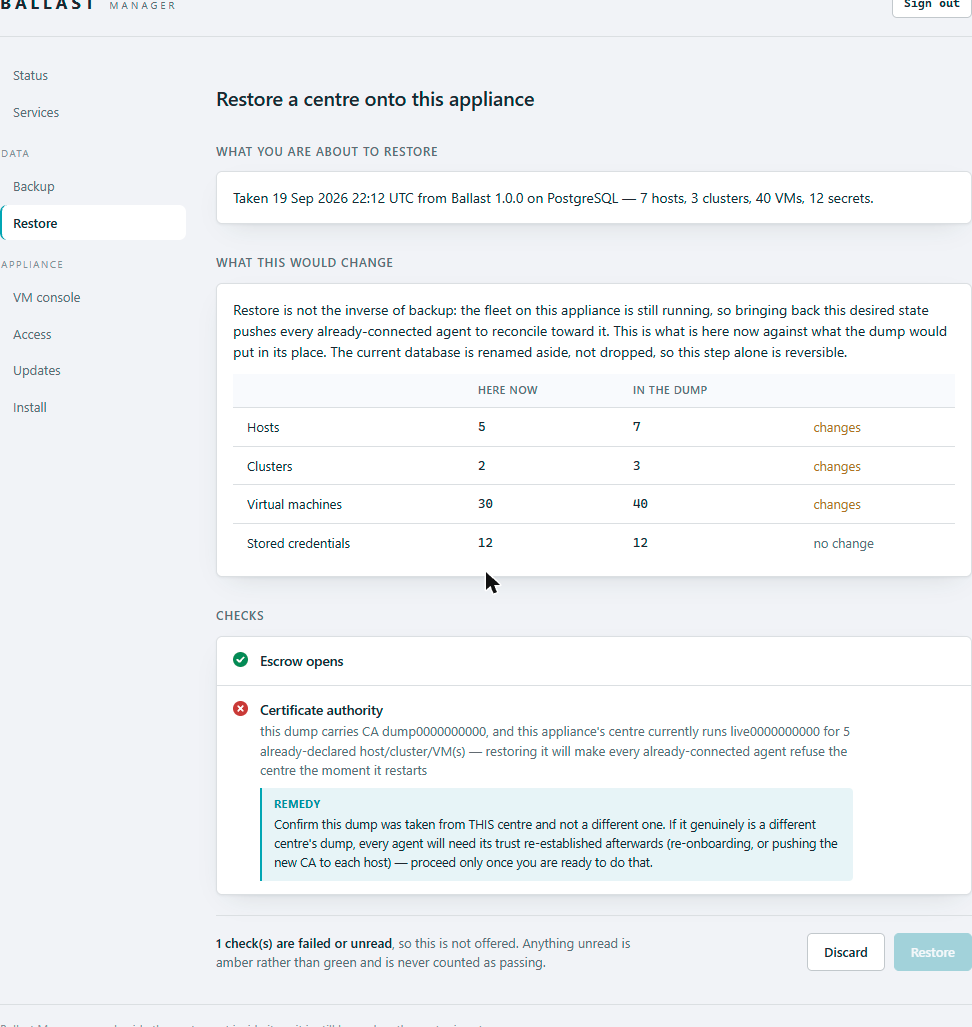
Review the diff. What is declared here now, per object kind, against what the dump would put in its place:
-
Read the checks. Escrow-matches-dump, PostgreSQL version compatibility, disk space, and, the one that decides whether the fleet's trust survives, Certificate authority. A recent backup records its own CA fingerprint, so this is a real comparison against the CA this appliance's centre currently runs, not a guess: the same CA passes outright; a different CA onto an appliance with no hosts declared yet passes too (an ordinary disaster-recovery restore establishing a new authority); a different CA onto an appliance that already has a populated fleet fails, and is shown as blocking rather than let through quietly.
-
Restore. The centre stops, the dump loads into a staging database, its contents are verified against the manifest's own counts, the secret key is written, and only then is the restored database swapped in, the previous one is renamed aside, never dropped, so this step alone is reversible. The centre starts again and the CA is checked once more; it should match exactly what the diff already told you.
Every step of the run is shown as it completes, with the plain reason it stopped if it does, never a raw error with no remedy attached.