Deleting and rebuilding a cluster
Verified end to end 2026-09-16 against a real cluster (WLGDC, 2 nodes) on
a live appliance: capture, decommission, full rebuild via the wizard,
recovery from a real witness-permission failure, and re-adopting the
original LUN with its data intact.
This is real, disruptive infrastructure work, not something to practise on a cluster holding production VMs. Before doing this for real, move or fail over anything the cluster is currently primary for, the same way you would before any maintenance that takes a cluster's storage and networking apart.
1. Capture the current desired state first
Before deleting anything, the cluster's Desired state tab shows the full declarative document the centre would otherwise be your only record of:
{
  "apiVersion": "ballast/v1",
  "kind": "Cluster",
  "meta": { "name": "WLGDC", "generation": 7 },
  "spec": {
    "members": ["HVNEW01", "HVNEW02"],
    "managementIP": "192.168.1.200",
    "witness": { "type": "FileShare", "fileSharePath": "\\\\podman.ballast.local\\witness" },
    "storage": { "kind": "iSCSI", "iscsi": { "portals": ["10.0.60.60", "10.0.61.60"], "targets": ["iqn.2026-09.local.ballast:primary"], "credentialSecret": "NewIscsi" } },
    "volumes": [{ "name": "VMStorage", "source": { "serialNumber": "676a1462-835e-4387-9e42-e58e97973a01" } }],
    "switches": ["… full SET switch, uplink NICs and per-host management/live-migration/storage vNIC addresses …"],
    "liveMigration": { "enabled": true, "authenticationType": "Kerberos", "networks": ["10.0.10.0/24"] },
    "replicaBroker": { "name": "WLGDC-Broker", "staticIP": "192.168.1.222", "storagePath": "C:\\ClusterStorage\\VMStorage\\Replica" }
  }
}
That is the console's view of the document. The apiVersion and kind keys are
added for display and are not part of what the API accepts. See
Desired-state contracts
for the real shape and the meaning of each field.
Use the Export button on that tab, or copy the document by hand, this is the only copy of what was declared, and rebuilding from the wizard means retyping every field unless you have it to check against.
2. Delete the cluster
From the cluster's ⋮ menu, Delete cluster opens a dialog that is explicit about how much it's about to do:
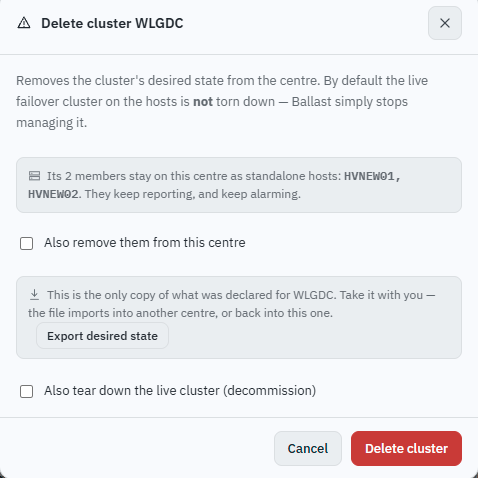
By default, deleting only stops Ballast managing the cluster, the real failover cluster on the hosts is untouched, and the hosts stay onboarded as standalone. Ticking Also tear down the live cluster (decommission) exposes the real teardown:
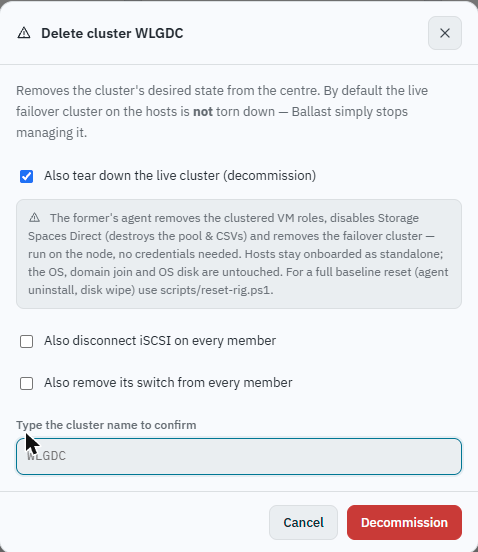
Two more checkboxes control how deep the cleanup goes, disconnect iSCSI on every member and remove its switch from every member, both unticked by default. Think carefully before ticking the switch removal option: the SET switch usually carries the host's own management IP, so removing it disconnects the host from the network the centre reaches it on. This walkthrough left both unticked and rebuilt on top of the existing iSCSI sessions and switch.
If you do want a genuinely clean rebuild
The New cluster wizard refuses to configure a switch a host already has , "authors a cluster; if a real cluster with this name already exists, the designated former observes it and does not re-form it" is about the cluster, but the switch step needs a host with no switch of that name already on it to build one fresh. If you want to prove out a true from-scratch rebuild rather than reuse the existing switch, also remove the switch during decommission (accepting that the host will be unreachable over that switch until the wizard rebuilds it) or remove it by hand from each host's Networking tab first.
What's left behind
Deleting orphans anything that was scoped to the cluster but isn't itself a host, VM, or the switch/port declarations that live on a host. Check Settings → Leftovers afterward:
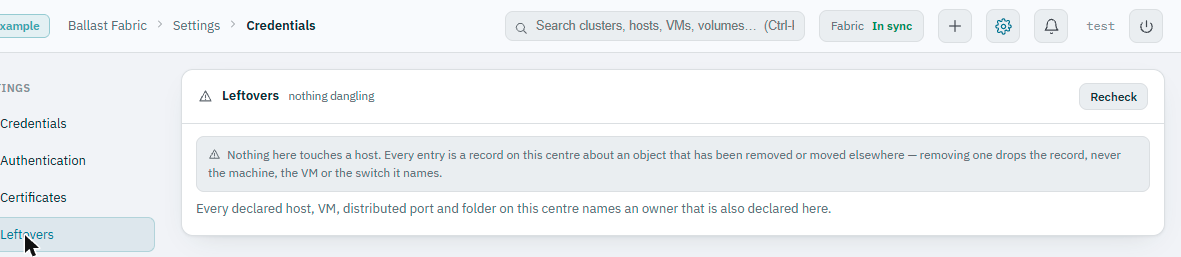
Nothing here touches a host, every entry is a centre-side record about something that's moved or gone. Removing one drops the record, not the machine, VM, or switch it names.
3. Rebuild with the New cluster wizard
From the fabric's + menu, New cluster… walks Nodes → Networking → Storage → Review, in that order.
Nodes: cluster name, member hosts, cluster management IP, and shared storage kind (Storage Spaces Direct, iSCSI array, or none yet), see Forming a new cluster for the fields themselves.
Networking: if a host already carries a switch of the name you're declaring, the wizard offers Import ConvergedSwitch from hosts, uplinks, vNIC addresses, gateways and DNS land pre-filled, though anything the host can't faithfully report (a storage vNIC's purpose, for instance, since that's not something a host reports back) needs your decision. On a clean host with no existing switch, the same fields start empty and every uplink and vNIC is chosen by hand, including the vNIC purpose dropdowns (Management / Live migration / Storage), which do not default correctly and must be set explicitly per vNIC, and MTU, which the console recommends at 9000 for every non-management vNIC when the physical fabric carries jumbo frames, again set individually per vNIC and not inherited from the uplink MTU setting.
Storage (iSCSI clusters): discovery portals, target IQNs and a CHAP credential. If member hosts already carry portals this cluster doesn't declare, leftover from a previous configuration, the console offers to clear them as part of forming, since dead entries are retried every reconcile pass and cost real time:
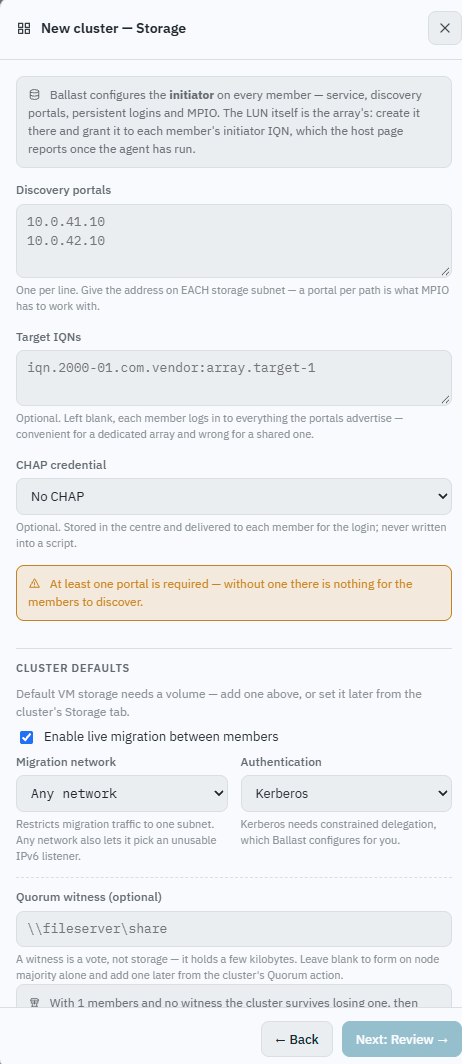
The same step also declares the quorum witness and live-migration network, and, if the witness's file share doesn't exist yet, tells you the one external step needed rather than failing silently later:
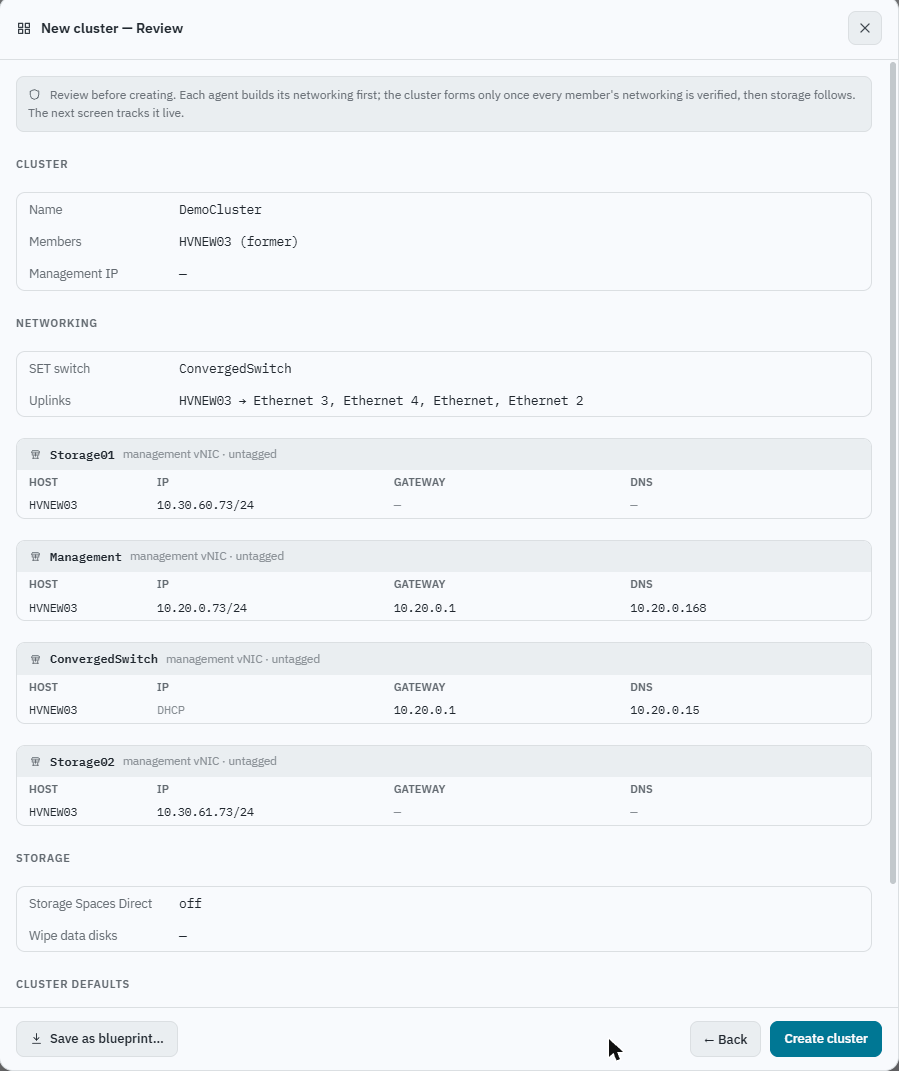
Review shows the whole declared cluster before anything is created, name, members, the full switch/vNIC layout, storage:
Creating it opens a Provisioning panel that tracks progress live and is safe to close, the agents keep converging in the background regardless:
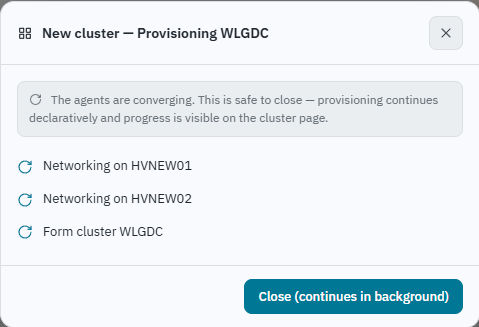
Networking builds first, the SET switch, then every management/live-migration/storage
vNIC, and only once that's fully settled does the agent actually run
New-Cluster. On a rig with several vNICs and jumbo-frame verification,
this step alone can take a few minutes; there's no need to keep re-checking
faster than that.
4. A real failure this pass hit: the witness's CNO doesn't exist yet
This is worth understanding before it surprises you. A cluster's computer
account (the CNO, here, WLGDC$) is created in Active Directory as part of
cluster formation itself. You cannot grant that account permission on a
witness file share before the cluster exists, because the account doesn't
exist yet, even if the share and a same-named CNO existed for a previous
incarnation of the cluster, a rebuilt cluster's CNO is a new AD object
with a new SID, and the old permission grant doesn't carry over even though
the name looks identical.
In practice, the first Set-ClusterQuorum attempt against the witness fails,
and the console names exactly why rather than leaving the operator to guess:
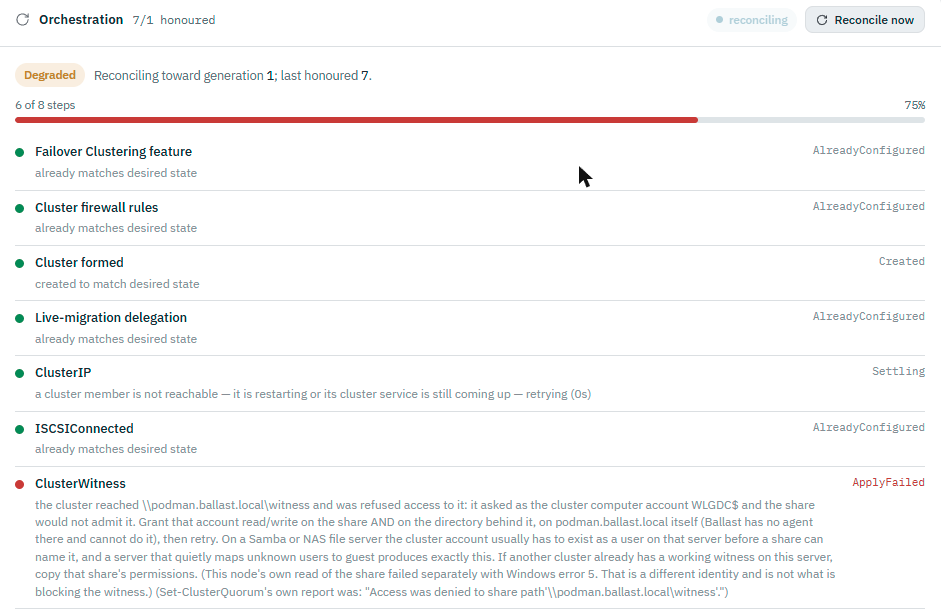
The fix is the one the message names: grant the new CNO read/write on the share (and the directory behind it) on the file server itself, Ballast has no agent there and cannot do this for you. Once granted, the next reconcile pass (or Reconcile now) retries and the witness comes online.
The sequencing to remember: you cannot pre-authorise a cluster's CNO on an external resource before the cluster is actually provisioned, the account simply doesn't exist until then. Expect this step to fail once on a rebuild, fix the permission using the identity the failure names, and let it retry. This isn't specific to file-share witnesses; the same is true of anything else that authenticates the CNO to a resource outside Ballast's reach.
5. Reattaching storage
The cluster's Storage tab lists LUNs the array presents by serial
number. A LUN that previously belonged to the cluster (before deletion)
still exists on the array, Ballast never destroys array-side storage on
delete, and shows as unclaimed until adopted again. Right-click it for
Add volume…, which opens Adopt a LUN:
-
If no member has inventoried the LUN's contents yet, the dialog says so explicitly and declines to guess either way, rather than presenting a false choice between "empty" and "has data." This cleared on its own once the iSCSI sessions were healthy and the array had actually been scanned, no separate action was needed, just a pass.
-
Submitting the adopt against a LUN that turns out to hold real data does not format it. It fails safely instead, naming exactly what it found:

This is the same LUN this walkthrough had captured in its desired-state backup at step 1, the serial matched exactly, so Adopt as is was the correct choice: it brings the existing volume into the cluster without formatting it, confirmed by a second dialog making that explicit before committing. Wipe and adopt is the other named option, for when the LUN's existing contents are genuinely finished with, Ballast never picks one over the other on its own.
-
Once adopted, the volume shows as
provisioningwhile the cluster actually brings the disk online, adds it as a clustered disk, and mounts it as a Cluster Shared Volume, this lands on the next reconcile pass, not instantly.
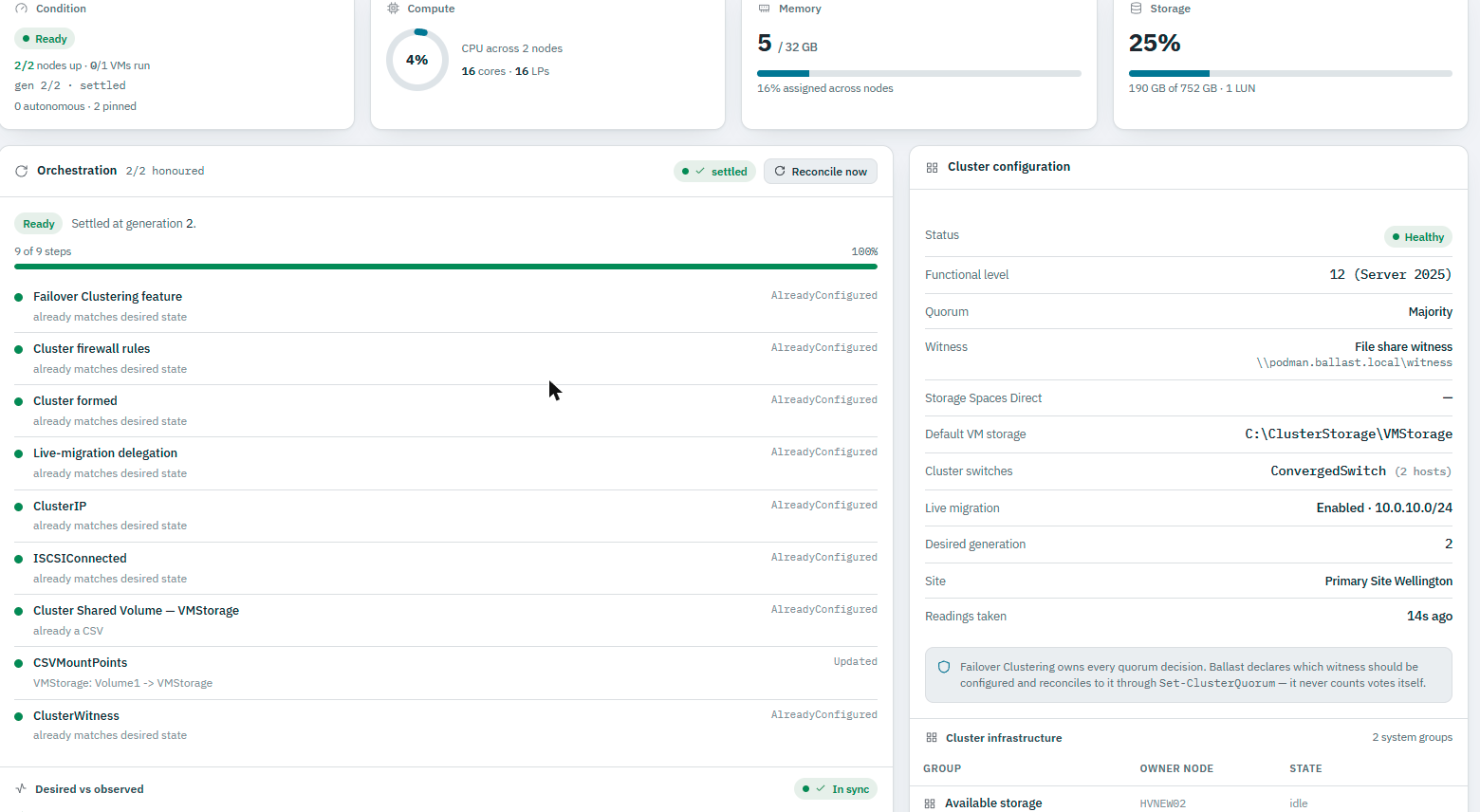
The one identifier that matters throughout is the LUN's serial number, matching that against what you captured in step 1 is what makes "Adopt as is" a safe, deliberate choice rather than a guess. The end state matches the original desired-state capture from step 1 exactly:
6. Reconnecting VMs and replication
Neither VMs nor Hyper-V Replica configuration are destroyed by any of the above, a VM whose cluster role was removed keeps running on its host, just outside cluster management until the cluster reforms and reclaims it. Replication that targeted the deleted cluster's Replica Broker shows the broken target until the cluster (and broker) exist again; it does not need to be re-declared, only reconnected once the broker is back.